
You Are Here: Home » Articles » OS » Software » Tech » Tips & Tricks » Windows 7

Windows 7 tip: Control Windows Media Player right from the taskbar

By on June 22nd, 2009     

wm_tn_wmp11xpWindows 7 doesn't have the in-built function of the Windows Media Player - Quick Launch integration. All the versions of  Microsoft's Windows operating systems prior to the Windows 7 OS have this functionality wherein when you minimise the Windows Media Player, it would go dock into the Quick Launch bar, provided Quick Launch - Media Player integration was enabled.

Strangely enough, Windows 7 doesn't have this functionality. This was really a very important feature that saved us from a few more clicks and made controlling the Windows Media player very easy. Although there does exist ways of hacking into your system and make Windows7 media player controls in taskbarthe Windows Media Player dock into the Quick Launch, but why do all that when Windows 7 provides you with a very different method of controlling your favourite Windows Media Player.
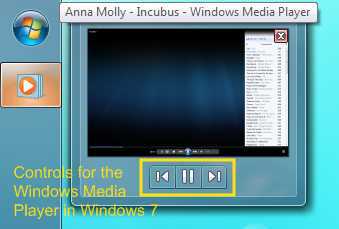
All you need to do is just hover over the Windows Media Player tab on the System Taskbar, the preview windows that shows up for Windows Media Player has options for controlling your Windows Media Player. Although, the controls provided are very basic - Previous Track, Play/Pause, Next Track. It does serve the purpose and is really good for a change! Please let us know how you feel about this new functionality by leaving a comment.

from


         Submit to Reddit     Stumble


Related Posts by Tags: , , , , , , ,


  • Pingback: Windows 7 tip: Control Windows Media Player right from the taskbar … | Current Technology Updates daily

  • http://www.fashioncravings.com/ Emily 

    Windows 7 really wonderful effect………. A new sensation.

  • Pingback: Controla tu Media Player desde el taskbar « Juan Pablo Alonzo González

  • r

    it’s not really special, but handy indeed :) .

    • http://digitizor.com The Digitizor

      Yes, it is indeed a very handy shortcut

  • JessicaD

    Digitzor,

    Windows 7 offers a great new feature called, "Pin to taskbar" where you can access Windows Media Player from the taskbar. Microsoft made this change to make functions a little easier. There are also several tips and tricks which are perfect and only for Windows 7. To learn more, Microsoft does have a site with whitepapers, tutorials, walkthroughs and screen casts on all the “under the hood” features in Win 7. Check out the Springboard site for Windows 7 on TechNet here http://tinyurl.com/832nco

    Jessica
    Microsoft Windows Client Team

  • Jonathan

    I was actually looking for this function, I was missing it in windows 7 but now it’s really cool! :) thanks for the info

  • http://rockettproject.com noeatnosleep

    It’s a nice feature, but I prefer the old method of having it docked. I would like to have the volume available, so i can adjust it, rather than the system volume, and I would like to be able to see the song title.

    the new feature is quite nice, but the old feature is what I want, and should still be an option. Not sure why they didn’t incluse it.

  • D_distructor

    pls pls enable back windows media player taskbar. this sucks

  • http://www.pcbestregistrycleaner.com/ best registry cleaner

    In win7 you could disable unnecessary system sounds:
    Press Windows Key + R to open the Run window. Type “mmsys.cpl” and hit Enter.
    Go to the Sound tab. Select “No Sounds” from the Sound Scheme dropdown box.

  • OosavvyoO

    I would prefer it docked so i can just look up and see what’s playing without stopping what I’m doing.


Windows 7 tip: Control Windows Media Player right from the taskbar was originally published on Digitizor.com on June 22, 2009 - 5:33 am (Indian Standard Time)