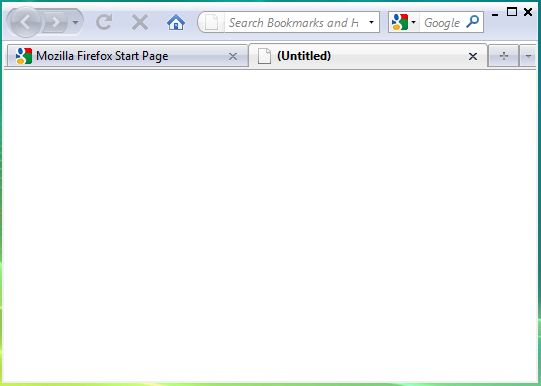
 Mozilla Firefox takes up much viewable area on your screen due to the presence of it’s number of toolbars such as the Menubar, Statusbar, the Caption bar and the Bookmarks bar. One simple way to get more viewable area while using the Firefox browser is to hide these four above mentioned toolbars. In this article we will tell you how to hide these four toolbars in Mozilla Firefox and thereby increase the viewable area.
The image below clearly marks all the four toolbars in the Mozilla Firefox browser. We will now tell you how to hide all the four toolbars, one by one.
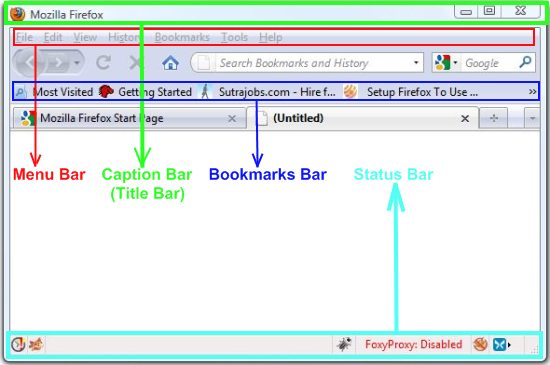
To hide the Menu Bar
The Menu bar can be easily hidden by installing the Firefox add-on, hide Menubar.
To hide the Title Bar (Caption Bar)
In order to hide the Title Bar, all you need to do is just install the add-on, hide Caption Bar.
To hide the Bookmarks Bar
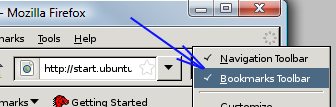 The Bookmarks toolbar can be hidden by un-checking the “bookmarks toolbar” option. Right click on the Navigation Bar or the Menu bar in Firefox. A menu will pop up showing the list of tool bars you want to show. Un-check the “Bookmarks Bar” option from that menu.
To hide the Status Bar
The status bar (at the bottom) can be hidden by installing the add-on – auto Hidestatusbar
Tip: You can also hide the Navigation bar in the same as you have hidden the Bookmarks Bar.
The image below shows how your new Mozilla Firefox browser will look like with more viewable area.