 Your wordpress blog is your platform for self-expression. So, you must ensure that your blog is protected from viruses, worms, malware and code injections. The wordpress software you is generally safe from being infected by any worm as the guys at Automattic check all the scripts thoroughly before releasing it for general download. The files that come under scanner are the template files of the theme you use on your blog. In this article we will tell you how you can use the WordPress Antivirus to scan your template files and stay safe from any infections.
Note: If you are having a wordpress hosted blog (for eg. xyz.wordpress.com) then you need not worry. This article is for users who use the wordpress.org software to run blogs on their personal webspace.
AntiVirus for WordPress is a plugin that monitors malicious injections of stealthy code and warns you of any possible attacks. It has multilingual support and is very simple, easy to use and is FREE of charge. Installation is very easy. The Antivirus WordPress plugin installs the same way as you would install any other plugin on WordPress. After the plugin is installed, look for a new entry named Antivirus under the settings section in your wordpress administrator’s panel.
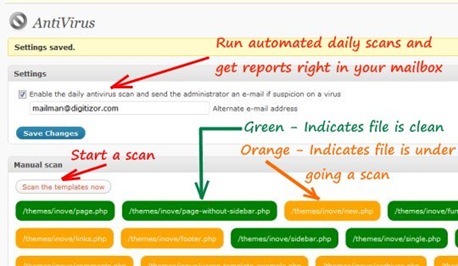
Running a scan on your WordPress theme’s template files is very easy and finishes in no time. The various template files are listed one by one. If the file has a green mark, implies it is not affected. An orange mark implies that a scan is currently under progress. You can also schedule daily scan reports and get email notifications automatically. Below you can see a screen shot of the Antivirus plugin in action:
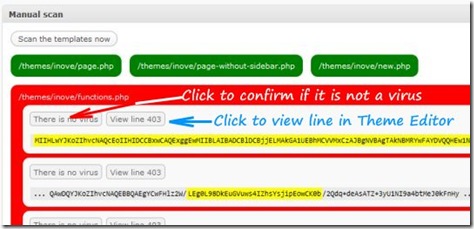
If a virus or a suspicious code-snippet is found in a particular template file, that file is then marked as affected and you are shown a line number where the doubtful code snippet was found after the scan. You can directly go to the particular line number in the Theme Editor by clicking on the “View Line” button. Check this screen shot below:
Alternative Download Location: http://wpantivirus.com/