Microsoft released a chart explaining the the upgrade path of Windows Xp and Windows Vista users to Windows 7. This chart was sent by Microsoft to Walter S. Mossberg of The Wall Street Journal. The chart is shown below:
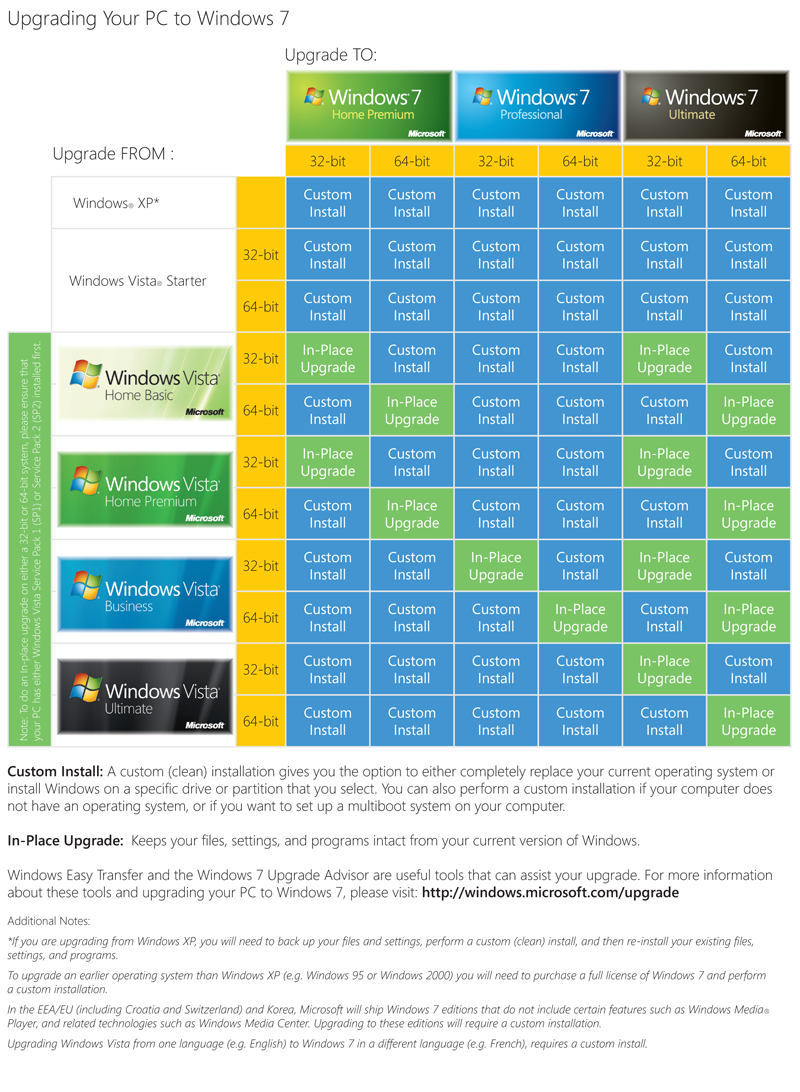
While the chart contains some errors like the inclusion of the Windows Vista Starter 64-bit edition, which doesn’t exist, it is fairly self-explanatory and simple enough for an average user to understand. However, the main points of the chart in brief are
- You have to do a clean install if you want to upgrade from Windows Xp or Windows Vista Starter.
- For Windows Vista Home Basic and Windows Vista Home Premium, you can upgrade to Windows 7 Home Premium and Windows 7 Ultimate directly. However, if they want Windows 7 Professional, they have to do a clean install.
- Windows Vista Business users can upgrade to Windows 7 Professional and Windows 7 Ultimate directly. However, they need a clean install for Windows 7 Home Premium.
- Windows Vista Ultimate users can upgrade directly to only Windows 7 Ultimate.