If you use WordPress as your blogging engine, Firefox as the browser and Skype as your online communication tool then there is a high chance that your blog must have been a victim of gwProxy – jsProxy code insert bug. The symptoms are insertion of a particular code snippet at the end of your post when you toggle to html mode in the editor. In this article we will tell you how to get rid of this bug.
The error / bug which we are talking about will get clearer to you from this screenshot below:
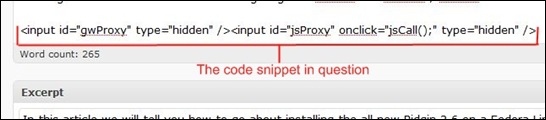
This code snippet is inserted only when you switch to the text mode from the rich mode in your WordPress blog editor. The results of this code snippet are not known but it is always safe you take a remedy.
When you install Skype on your computer it installs two firefox add-ons – the Skype Connector and the Browser Highlighter. Now, for the above situation, the Browser Highlighter plugin is the culprit. All you need to fix the bug is to simply disable the Browser Highlighter plugin and restart your firefox browser.