How to install the WinXP HyperTerminal client on Windows Vista or Windows 7 [FREE]?

By on August 29th, 2009     

hyperterminal-vista-windows7 HyperTerminal is a Windows XP application that helps you to connect your computer to other  remote computers. This application is also used by NetAdmins to connect their laptops to switches to perform regular maintenance operations.

But Windows Vista or Windows 7 do not include this application by default. All the alternatives available are either paid and the free ones are not up to the mark. In this article we will tell you how to install the Windows XP’s HyperTerminal client on Windows Vista or Windows 7.

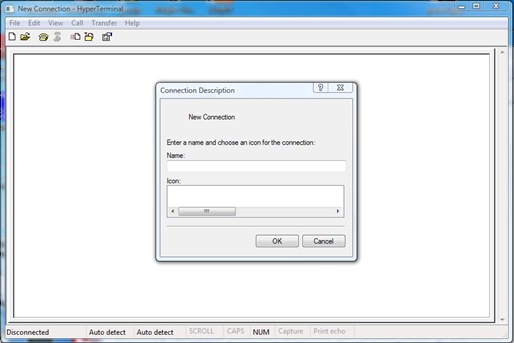
First of all you need to get access to a Windows XP machine and copy two files hypertrm.dll and hypertrm.exe from that system to your target Windows Vista or Windows 7 machine. Alternatively, you can download the files in a zip-package from here. Once you have the zip file, you need to extract the two files from that package to your target system (Windows Vista or Windows 7). CHeck this screenshot below.
hyperterminal-vista-windows7-screenshot

Make sure you keep the files hypertrm.dll and hypertrm.exe in the same folder. Now you can launch the HyperTerminal client by double clicking the hypertrm.exe file. And there you have a fully working HyperTerminal client.

This HyperTerminal client functions normally on your Windows Vista or a Windows 7 system as it would on any other Windows XP system. The best part about this method is that the HyperTerminal client you get this way is both free and it works.


         Submit to Reddit     Stumble


Related Posts by Tags: , , , ,


  • http://www.urbanillusions.org crumpet

    Awesome, thanks!

  • http://www.techcats.net Rajesh Kanuri

    looking for this from a long time.. thanks..

    • http://digitizor.com The Digitizor

      Glad you liked it :-)

  • A_O_C

    One problem. If you try to open a connection by clicking on it, it says it cant open the session. Steps below to reproduce:

    - open HyperTerminal
    - create a new connection (I used “cisco”)
    - click File > Save As
    - save it somewhere (I used my desktop)
    - close HyperTerminal and double click the connection you just saved

    Can anyone provide the steps to fix this? This worked fine in Windows XP.

    • Anonymous

      Hi put the files in system32 filefolder
      then assosiate the *.ht files with hypertrm.exe

  • Pasan

    Thanks. Working nicely on win7

  • Jose Cruz

    MAGNIFIC !!! THANK YOU VERY MUCH

  • http://www.bisdakworld.com JVPACOIN

    This is awesome…. thanks for the info. i’ve benn looking for this for a long time….

  • Adnan Javed

    Great….thanks!!!

  • V.S.Kumaran

    Great !!! Thanks

  • mmmm

    awesome, thanks a lot.

  • MR.CCNA

    Working awesome thank you

  • Shahram

    Thanks alot it works very good

  • http://digitizor.com The Digitizor

    Hey Shahram, glad you liked it :-)

  • Dominic

    Keyboard is not working

  • Terry Jones

    This hyperterminal will work on any version of Windows 7 (Home, Pro, etc)or do you need pro and above foe XP functionality?

  • Pingback: Serial port in Vista

  • nivesh

    thx a lot…..

  • Ed

    Brilliant. Thank you!

  • Matthew

    U’re rad. Thanks

    • Anonymous

      Glad You liked this article :-)

  • Wolfe

    Only see tcp connection but need usb to serial on com1 can this be configured?

  • Kasun

    This post was indeed very useful.
    Please keep up good work.

  • Anonymous

    Hi,

    Thanks for the tips, however, I still have the “can’t open session” problem, even when I place the two files in the System32 Folder. Does anyone have any more ideas on what the problem is?

    When I manually open the *.ht file, then it works OK, Just double-clicking the *.ht file isn’t working as it should…
    Thanks for any feedback that someone could provide

    • aggy

      This happens in Vista and 7, but I’ve found a fix. Make the same file assocation with Hyperterminal as usual, then Download Types ( http://types.sourceforge.net/ ).

      Open up Types and look for the .ht file extension. When you open the properties of it, you’ll see quotation marks around the entire path, something like:

      “C:hypertermhypertrm.exe” “%1″
      Change it to
      C:hypertermhypertrm.exe %1

      And you should be good to go. I’ve tested it on 3 Windows 7 machines and it worked with all of them.

  • elvis

    great and thanks a lot

  • Anonymous

    i am going to site your internet address but I do not know an editor or updater of this website. Where can I find that?

  • David D

    Many thanks. This is the only place on the web to get hyperterminal!

    • Anonymous

      Glad, it was of help :-)

  • http://www.itsupportguys.com IT Support Guys

    Great tip!

  • http://dobrestii.ro Pedro

    This is really great, thanks!

  • Pingback: setting up my first cisco router « routerxyz

  • Pingback: Google Maps on Laptop with GPS on Option GTM378 | TheAnand

  • Anonymous

    i do hope this will work for me as it did for other persons

    and once more thanks ..

  • nick

    You may also need:
    hticons.dll
    hypertrm.chm
    hypertrm.hlp

    • http://indodesain.org Muhazir

      where to get the file? please

  • mmm

    push

  • Guest

    Installed as described but when trying to make a connection, it only allows me to select Comm3 which is a problem as the USB/Serial adapter is not on Comm3. Any ideas?

  • Jetskier2k

    Greatttt… It’s working in my pc. Thanks a lot…
    I just copy all files hyper*.* from my old pc to new an that’s it.

  • KP

    IT WORKED!!!! Thanks so much!!!!

  • Scott

    if you’re a system administrator and couldn’t figure this out on your own — you’re fired!

  • Olololo

    the link is dead! could you please put it once again?

    • Anonymous

      Thanks for notifying us. We have fixed the link now :-)

  • Yashballal
  • Foo

    Free alternatives not up to the mark of Hyperterminal? What a joke… just like Hyperterm. RealTerm is pretty good.

    • Anonymous

      Really? I did not try RealTerm. Okay let me give it a try. Thanks for the in formation.

    • Stôffé

      Did you get RealTerm to run on Win7-x64? If yes, how did you do it?

  • locrte

    its not working ….why???

  • http://digitizor.com The Digitizor

    What error are you facing?

  • Nik

    GREAT!!! You just save my day!!! and not only!!!

    • http://digitizor.com Debjit

      Thank you Nik!

  • http://www.hcl.in ajaz

    thanks dear

    • http://digitizor.com Debjit

      Welcome Ajaz :-)

  • rich

    Only allows me to connect on TCP/IP (winsock) not my comm or serial port. ???

    • http://digitizor.com Debjit

      Works for me allows me to connect those ports, please try again

      • rich

        had to reinstall modem. for some reason drivers were corrupted. ?? looks like two seperate issues, both solved now. thanks for you help.

  • Lee

    Thanks

    • http://digitizor.com Debjit

      Welcome :-)

  • http://www.ewdunn.com Wayne Dunn

    Worked perfectly. Thanks. I can now communicate with my serial devices using Windows 7

    • http://digitizor.com Debjit

      Really glad that it worked for you :-)

  • http://electrolinks.blogspot.com Migsantiago

    This method has glitches. By importing the hyperterminal from XP to Win7 there are some TCP socket glitches and virtual com port glitches. I would NOT fully recommend this guide.

    Instead use PUTTY or MTTTY.
    http://sites.google.com/site/hb9cuf/download

  • Pasan Indeewara

    Thanks for the Hyper Terminal files.. :)

    • http://digitizor.com Debjit

      Welcome Pasan

  • Ami Dardazon

    There are pretty good alternatives to Hyper terminal.
    You can see few of them here http://www.kreslavsky.com/2010/03/hyperterminal-in-windows-7-and-vista.html

  • http://digitizor.com/2009/08/29/how-to-install-the-winxp-hyperterminal-client-on-windows-vista-or-windows-7-free/ Aditya

    GREAAAATTTT…
    Thank you very much Sir / Ma’am … You’ve done excellent job. I feel, I should pay you for this . ..
    THank you sooooooo much for putting this hyperterminal.

  • Shah Ahmed Raquib Litu

    Its a nice and very good tips. good job. Litu – Bangladesh.

  • Michael

    Looks good haven’t tried to connect to anything yet. I saved the connection and it went into the usual place under accessories-comunications-Hyperterminal but it wouldn’t reopen from there. I cut and pasted it to the same folder as the exe and dll files but it still wouldn’t reopen there either. Do I have to recreate the connection every time I want to use it?

  • Rab Tech

    thanks!! it solved me a big problem with my work teams!! would like to hug you for that :D

  • Lamincolley6

    I have successfully downloaded hyper terminal but is asking me to dial a phone number. How can i use hyper terminal without dialing phone number?

    If it displays hyper terminal window what command do you first enter?

    • Youngbuckgamer

      just go to com1 or com4 if your using it for routers and switches

      • Anonymous

        Thanks for the tip

  • Jeremy

    I used a thumb drive on my friends XP and did a search for “hyper” in the C drive. Everything that came up I copied and put in a folder called “hyperterminal” and put on my USB stick. I put the “hyperterminal” folder on my harddrive in the accessories folder. I made a shortcut of the hyperterminal icon to my desktop and everything works great….I’m in telecom and I use hyperterminal often. I set modems to auto baud, I check SMDR raw data just to make sure the PBX is outputting data. I check MCI meta raw data to make sure the PBX is outputting. It’s just a great troubleshooting tool. I wonder what nimrod decided no hyperterminal in Windows 7. Just a bad idea. It works now!!!

  • Pingback: ztransformer - Page 6 - Chrysler 300C Forum: 300C & SRT8 Forums

  • Pingback: How to Install the Windows XP HyperTerminal Client on Windows 7 | Omega IT Solutions, LLC

  • Philemon Thindisa

    Phizpop. Hi guys thank you very much for expanding my knowledge, the hyper terminal works super. I appreciate your help you saved my life it works perfect

  • Shane Hulme

    See http://answers.microsoft.com/en-us/windows/forum/windows_7-windows_programs/does-windows-7-support-hyper-terminal/79dc1358-8613-44fd-a97e-ce0bcb86a497 for details on Registry change needed for Sessions to be saved, that is.ht files. Hint – make sure only one copy of the exe and dll on your pc.

  • Celtic_one31

    will this work if I pull it from a 32 bit win xp pro to a 64 bit win 7 pro?

  • Pingback: » Blog Archive » Hyper Terminal terminated?!

  • Pingback: Hyper Terminal no Windows 7 « Rudinelly's Blog

  • John Knee

    I have copied HyperTerminal from XP to Win 7 and can only see the the TCP/IP (Winsock) option not the ComX option in XP…….Any ideas??

  • Samnbr

    Nice info..tnx buddy

  • George

    Is working on W7.

  • Bayeakdjiby

    J AI BESOIN HYPERTERMINAL CAR JE TRAVAILLE AVEC


How to install the WinXP HyperTerminal client on Windows Vista or Windows 7 [FREE]? was originally published on Digitizor.com on August 29, 2009 - 11:33 pm (Indian Standard Time)