 Windows Live Writer is the favorite Blog writing software for many bloggers on the Windows Platform. Although Windows Live Writer has many features but it lags a feature of saving the drafts of blog posts automatically. As a result you might end up losing your blog entry, unless you may have saved it manually or published it. In this article we will tell you how to Auto Save drafts of blog posts in Windows Live Writer at regular intervals.
1. Open Windows Live Writer, then go to Tools > Options from the menu.
2. From the Options window that opens, click on Editing in the Menu. Now check the “Automatically Save Drafts” option and set a time interval that how often you want your draft to be saved. The default value is 3. But the recommended value would be 1. This way you will reduce your chances of losing any post’s draft.
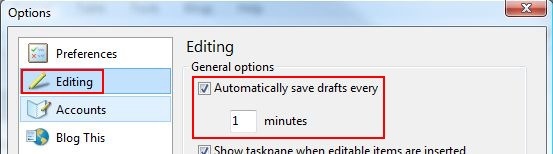
After you save all the settings, you may notice that your blog drafts get saved automatically every 1 minute. No more manually saving the drafts. So you can write your heart out without worrying about losing any thing.