How to disable Popup Bubble notifications in Pidgin messenger?
 Pidgin Messenger is one of the best IM clients out there for Linux. Pidgin has a feature that notifies you of new incoming messages via a Popup bubble top right of your screen (using libnotify). Although useful, this may seem to be annoying for many. So, in this article we will tell you how to disable the Popup Bubble notifications in Pidgin messenger.
Now just follow these steps in order to disable these Popup Bubble notifications in Pidgin messenger:
1. Open Pidgin. Go to Tools > Plugins from the menu bar in the main window.
2. In the Plugins list window that opens, uncheck the plugin called Libnotify Popups.
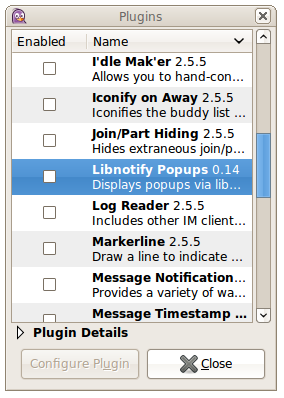
3. Restart Pidgin and you are done. You will no long receive any popup notifications from Pidgin from now on. Similarly, you can also disable such notifications in Empathy messesnger.