You Are Here: Home » How-To » Linux » Troubleshoot

How To Enable Nepomuk/Strigi Desktop Search in Kubuntu 9.10/KDE4.3

By on October 14th, 2009     

nepomukstrigi_logoNepomuk/Strigi is a very powerful desktop search in KDE. Strigi is the file indexer which allows for search not just by the file name but by the content of the file as well and Nepomuk is allows for the tagging and rating of the files and it is integrated along with the desktop search.

In Kubuntu 9.10/KDE 4.3, Nepomuk/Strigi is disabled by default. To enable it follow these steps:

  1. Press "Alt+F2" to launch KRunner.
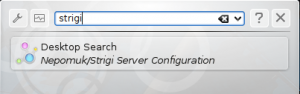
  2. Enter Strigi in KRunner and run Desktop Search.strigi1
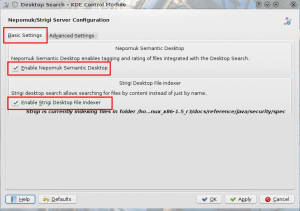
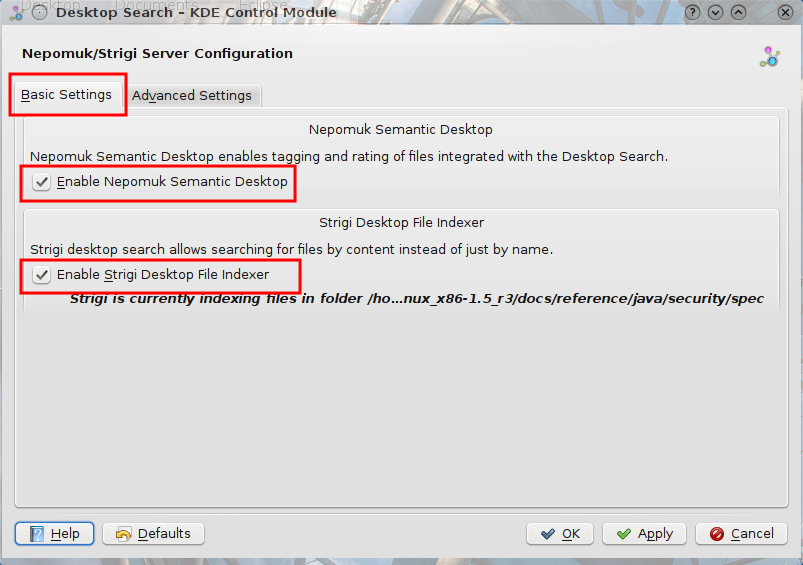
  3. In the Desktop Search Control Module, under the Basic Settings tab, check both the check boxes next to Enable Nepomuk Semantic Desktop and Enable Strigi Desktop File Indexer.strigi2
  4. Click on Apply.

It is very possible that you get an error which says "Service failed to initialize, most likely due to an installation problem" with Strigi when you click on Apply. This is due to a problem with the Java Runtime and can be fixed by a simple symbolic link. Here is the fix for it:

Find out if you are using OpenJDK or Sun Java

If you do not know if you are using OpenJDK or Sun Java, open Konsole and run the command

java -version

Now you will get to know if you are running OpenJDK Runtime Environment or Sun Java Runtime Environment. As you can see from the screenshot below, I am running OpenJDK.strigi3

Open JDK Runtime Environment

If you have OpenJDK Runtime Environment, run the command given below

For 32-bit:

sudo ln -s /usr/lib/jvm/java-6-openjdk/jre/lib/i386/server/libjvm.so /usr/lib/libjvm.so

For 64-bit:

sudo ln -s /usr/lib/jvm/java-6-openjdk/jre/lib/amd64/server/libjvm.so /usr/lib/libjvm.so

Sun Java Runtime Environment

If you have Sun Java Runtime Environment, run the command given below:

For 32-bit:

sudo ln -s /usr/lib/jvm/java-6-sun/jre/lib/i386/server/libjvm.so /usr/lib/libjvm.so

For 64-bit:

sudo ln -s /usr/lib/jvm/java-6-sun/jre/lib/amd64/server/libjvm.so /usr/lib/libjvm.so

After running running the command for either OpenJDK or Sun Java Runtime, click on Apply again and Strigi should be working now.


         Submit to Reddit     Stumble


Related Posts by Tags: ,


  • David

    Thanks for that. Works as well with PCLoS Kde4 so I presume it would work with all Kde4 systems.

    • Ricky

      Yes it should work with all KDE 4.x systems

  • http://sadphaeton.com Tom Willis

    Wow thanks for this. I’ve been wanting to try to utilize desktop search for a while and I always got this error and gave up. Not it’s indexing like a champ.

  • Tsvi

    Finally. Strigi is working again. I can’t start describing how much this has been bugging me.

  • Pingback: Emanuele (nuovodna) 's status on Sunday, 08-Nov-09 18:50:50 UTC - Identi.ca

  • Snowhog

    Thank you. Decided to try using Desktop Search. As I remember the issues with Strigi when it was first released, I Googled on: nepomuk jaunty 9.04 and noticed your link. I read it, followed it, and Desktop Search works. Yes, I had to create the symlink to my Sun Java Runtime Environment file, and stop/restart Strigi. But it then successfully index my /home/user partition. Cool.

    This was a clearly presented, easy to follow guide. Good job.

  • http://brzo.rs Nenad

    Hey, Ricky, thank you so much for this!

    Before Koala, I used Ubuntu with KDE thrown on top of it, and I thought that the Strigi problem is some king of conflict between Gnome and KDE or something like that. But now I have pure KDE – Kubuntu, and to my surprise I got that annoying error message when I tried to start Strigi. I wonder why is this issue addressed somehow trought the packaging system… It’s not fun snooping around for hacks on how to run a program that’s included in the OS by default…

    Anyway, thanks again. I really wanted to make this work because I use a Mac at work, so I want that fast file search :)

  • Ricky

    welc. :) Glad to know that the article helped you. :)
    if i remember correctly the problem with strigi/nepomuk has been there since Jaunty. wonder why it wasn’t fixed in karmic as its so simple to fix

  • dr.med.zoidberg

    Additionally to making a softlink for libjvm I (kubuntu/karmic) had to:

    - install package soprano-backend-sesame (was not installed by default)
    - edit ~/.kde/share/config/nepomukserverrc
    search line
    Used Soprano Backend=redland
    change to
    Used Soprano Backend=sesame2

    After restart of services nepomuk and strigi everything worked as expected.

    Credits go to http://www.yeap.de/blog2.0/archives/210-KDE-4.3-E

  • vyk

    Thanks a mil.

    This has been troubling me forever.

    I had installed the back-ends and all but didn’t have the link and when I installed the link and read “Strigi currently indexing files…” I was overjoyed.

    Thanks again.

  • daniel

    Hi

    thanks a lot, works for me. But I do have a question: it’s the first time I use strigi/nepomuk, and I expected a desktop search like Google’s Desktop Search or KBeagle (which I have in OpenSuse 10.1). That is, I would like to type a word and get all documents containing that word, but I can’t figure it out in Kubuntu Karmic. I have tried both the KRunner, and the command nepomuksearch: in Dolphin. Any help?

    Thanks!

    Daniel

    • Ricky

      To get make it work in KRunner, you need to install the necessary KRunner plugin. I am not sure if it is installed by default. However you can install it using
      sudo apt-get install plasma-runners-addons

  • http://www.squidoo.com/google-sniper-2-0 google sniper

    wow thank you so much for posting this…this is REALLY helpful to me

    • Anonymous

      Glad, we were of help :-)


How To Enable Nepomuk/Strigi Desktop Search in Kubuntu 9.10/KDE4.3 was originally published on Digitizor.com on October 14, 2009 - 6:26 am (Indian Standard Time)