You Are Here: Home » Articles » Linux » OS » Tips & Tricks

Fedora 13 Goddard – Reference Cheat Sheet

By on May 27th, 2010     

Fedora 13 Goddard is finally here and it looks better than ever. Keeping it's promise of incorporating cutting edge technology, Fedora 13 to has some amazing features. We bring you this cheat sheet so that you can get started with Fedora 13 linux in no time. We have included many tips and tricks and scoops that will help you to set up your new Fedora 13 installation into a full blown Linux box.
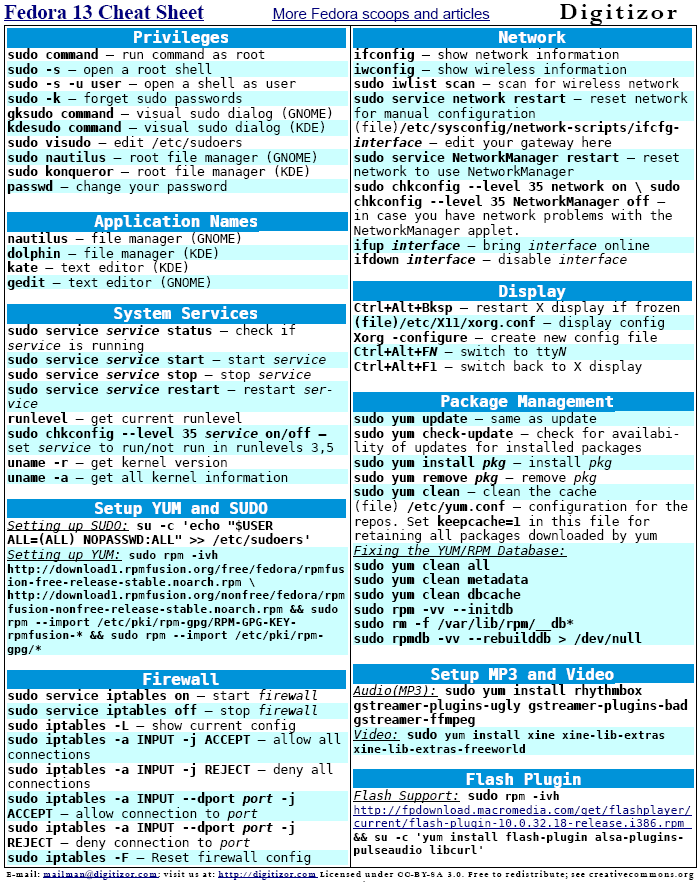
Here’s the Direct link to the above PDF. This sheet is free to modify and redistribute for your own needs; we just ask that you keep the Digitizor logo and a link to Digitizor: http://digitizor.com on the page. License: Creative Commons Attribution-Share Alike 3.0 Unported.

In this cheatsheet, the command for setting up yum is pretty long, so you can copy it from this command snippet:

sudo rpm -ivh http://download1.rpmfusion.org/free/fedora/rpmfusion-free-release-stable.noarch.rpm http://download1.rpmfusion.org/nonfree/fedora/rpmfusion-nonfree-release-stable.noarch.rpm && sudo rpm --import /etc/pki/rpm-gpg/RPM-GPG-KEY-rpmfusion-* && sudo rpm --import /etc/pki/rpm-gpg/*

And one more thing, Do spread the word!


         Submit to Reddit     Stumble


Related Posts by Tags: , , ,


  • http://sikkusblog.com sikku

    The title you have given is right. But the initial line itself has the wrong codename for Fedora 13. Please correct it.

    • Anonymous

      Hey Sikku, Thanks for pointing out the error… we have rectified it now :-)

  • Pingback: Get The Fedora 13 Reference Cheat Sheet

  • Pingback: Digitizor Weekly Roundup [Week 4, May 2010]

  • Jimmy Cracked Corn

    You Rock!

  • Pete

    For the multimedia section, i would be more likely to recommend vlc. The dependencies that come along with it provide codecs for most file types.

    A section on storage might be handy too:
    mount – show all mounted filesystems
    sudo umount /dev/sdx ->> unmount filesytem on device sdx
    sudo fdisk -l -> list all volume devices
    blkid -> list filesystems available on all storage devices
    sudo mount -t ntfs /dev/sdx /mountpoint -> mount the NTFS filesystem on device sdx at /mountpoint

    Another one I use often is dd, though it doesn’t quite fit on a cheatsheet. It reads info from a device block by block, without the need to interpret the data or mount the filesystem. You could use it to back up or wipe out whole disks, back up MBRs, and more. I use it to rotate images onto a flash drive; There’s an image of the ultimate boot cd, a dos boot disk full of BIOS ROMs, a linux live distro, and more. Usage goes like this:

    dd if=/dev/sdx of=bootdiags.iso -> makes an iso image of the device sdx. Note that the partitioning scheme and MBR will remain intact.
    dd if=fedora-live.iso of=/dev/sdx -> Now that the image is backed up, I can re-image my thumb drive with something more appropriate to the task at hand. It can be invaluable in the field.

    • Anonymous

      Thanks, Pete! That is some real good suggestion you have given. Will make a new version of this cheatsheet with all your points taken care of.


Fedora 13 Goddard – Reference Cheat Sheet was originally published on Digitizor.com on May 27, 2010 - 11:45 pm (Indian Standard Time)