You Are Here: Home » How-To » Linux » Software

How To Install Thunderbird 3.1 In Ubuntu 10.04

By on June 25th, 2010     

Thunderbird 3.1 was released a couple of days back with a lot of new features. We are not going to go over the new features. You can see them at the Thunderbird website.

Thunderbird 3.1 will not available as an update from the official repository and there is no PPA to install it from either. However, the Ubuntuzilla project has already packaged Thunderbird 3.1 for Ubuntu. This is how you can install Thunderbird 3.1 in Ubuntu 10.04 Lucid Lynx from Ubuntuzilla:

Update: Thunderbird 3.1 is available in the Ubuntu Mozilla Daily Build Team's PPA.

Installation instruction from the PPA:

$ sudo add-apt-repository ppa:ubuntu-mozilla-daily/ppa

$ sudo apt-get update

$ sudo apt-get install thunderbird-3.1
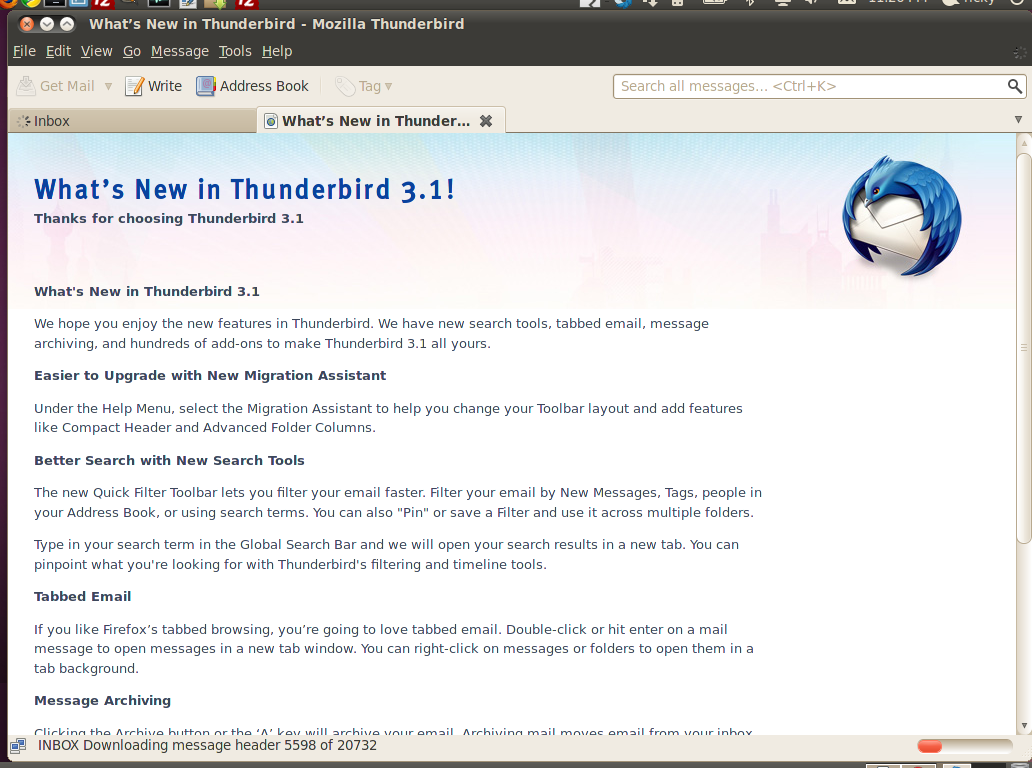
Click To Enlarge

Installation from Ubuntuzilla

  • Open the terminal.
  • Execute the command below:

echo -e "\ndeb http://downloads.sourceforge.net/project/ubuntuzilla/mozilla/apt all main" | sudo tee -a /etc/apt/sources.list > /dev/null

  • Then update the software list with the command:

sudo apt-get update

  • Then install Thunderbird 3.1 with the command:

sudo apt-get install thunderbird-mozilla-build
Thats it. You can find Thunderbird in the usual place at Applications -> Internet.

You can add it to the Ubuntu Messaging Menu as instructed here.

Note: You can download the package directly too from this link. However downloading the deb package and installing it may cause dependency issues. It is recmmended to use the above mentioned apt-get method only :-)


         Submit to Reddit     Stumble


Related Posts by Tags: , , ,


  • Pingback: Tweets that mention How To Install Thunderbird 3.1 In Ubuntu 10.04 -- Topsy.com

  • Pingback: How To Add Thunderbird 3.1 In The Ubuntu Messaging Menu

  • Error

    “sudo apt-get install thunderbird-mozilla-build” use this line instead this “sudo apt-get install thunderbird-mozilla-buid” its mistake

  • Daham Perera

    Thanks, this really worked. I have been trying several blogs to upgrade from V3.0 to V3.1. This was the only thing that worked… I wonder why ThunderBird FAQs does not provide this information.

    Once again thanks a lot for this post. Saved my day.. :)

  • 64bit

    32bit. useless

  • Fkoff

    this doesn’t work. followed your steps exactly.
    appreciate any additional guidance.

    root@diamond:~# apt-get install thunderbird-mozilla-build
    Reading package lists… Done
    Building dependency tree
    Reading state information… Done
    E: Couldn’t find package thunderbird-mozilla-build

    • http://digitizor.com/ Ricky Laishram

      Hey Fkoff, thanks for letting us know that it does not work anymore.
      Anyway, it is now available in a PPA. I have updated the post with the installation instructions.

  • Debjit

    test comment is this good?

  • rogerw

    “sudo apt-get install thunderbird-3.1″ doesn’t work for me after doing the other two (above). Not sure why. Is this the correct wording for sure?

    rogerw@rogerw-acer:~$ sudo apt-get install thunderbird-3.1
    Reading package lists… Done
    Building dependency tree
    Reading state information… Done
    E: Couldn’t find package thunderbird-3.1

    Roger

  • A. Non

    The current version in PPA, 3.1.5, doesn’t work with Lightning 1.0b2 apparently because of the version restrictions on lightning. Admittedly, I’m using a custom 64-bit version, so it’d be interesting to know if it works for people on 32-bit.

  • mark

    I think you should warn people that this is a potentially unstable testing release! I followed your instructions and after installation was worried to see that it called itself Shredder and thanked me for running a testing release! I’m sorry but email is crucial to me and although I’d like to help the community I really cannot afford any problems with email. How do I uninstall this and install a stable version of Thunderbird please?

  • LYN

    Hello,
    So Thunderbird is not a STAND ALONE email, but must have an email from a isp to use their ports etc, can I use this to replace microsoft Outlook ? as mine never works!!!Thanks Lyn

  • Pingback: Mail Confusion | Michael Gillson


How To Install Thunderbird 3.1 In Ubuntu 10.04 was originally published on Digitizor.com on June 25, 2010 - 11:02 pm (Indian Standard Time)