You Are Here: Home » Articles » Tips & Tricks

Fix “Filezilla Crashes On Opening New Tab” Error / Bug In Linux [Ubuntu]

By on September 25th, 2010     

Filezilla is one of the widely used FTP clients used by both newbies and professionals. Like tabbed browsing in most of the web browsers these days, Filezilla also started supporting Tabbed sites, wherein you can connect to multiple websites via FTP using just one instance of Filezilla through tabs. But a recent update in Ubuntu linux seems to have broken this feature. So, now whenever you try to establish connection in a new tab, Filezilla crashes. In this article we will tell you how to fix this issue.
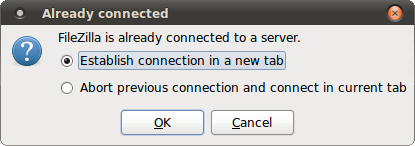
Opening new tab in Filezilla

This issue seems to be persistant with these versions of Filezilla: 3.3.1, 3.3.2, 3.3.3. The cause for this issue is probably a bug with the package - wxWidgets 2.8.10.1-0ubuntu1.2. However upgrading to Filezilla 3.3.4 fixes this issue. Filezilla 3.3.4 is not available in the standard Ubuntu repositories. You can install a third party repository in order to install Filezilla 3.3.4.

Install "ferramroberto" 3rd party repository

You can install the ferramroberto repository which has the latest verion of Filezilla 3.3.4 using this command:

sudo apt-add-repository ppa:ferramroberto/linuxfreedomlucid

Update Sources

After you install the repository, you have to update your software sources using the following command:

sudo apt-get update

Install Filezilla 3.3.4

You can install the latest version of Filezilla (3.3.4 as of now) using this command:

sudo apt-get install filezilla

After installing this version of Filezilla, you will no more face the error when you try to establish connection to a FTP site in a new tab in filezilla.
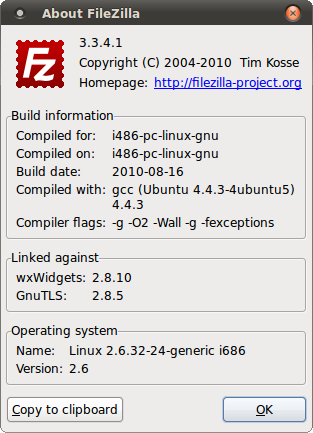
Filezilla 3.3.4


         Submit to Reddit     Stumble


Related Posts by Tags: , , , , ,


  • Pingback: Tweets that mention Fix “Filezilla Crashes On Opening New Tab” Error / Bug In Linux [Ubuntu] -- Topsy.com

  • nbeagle

    This fix didn’t work for me:

    matt@ludwig:~$ sudo apt-add-repository ppa:ferramroberto/linuxfreedomlucid
    [sudo] password for matt:
    Executing: gpg –ignore-time-conflict –no-options –no-default-keyring –secret-keyring /etc/apt/secring.gpg –trustdb-name /etc/apt/trustdb.gpg –keyring /etc/apt/trusted.gpg –primary-keyring /etc/apt/trusted.gpg –keyserver keyserver.ubuntu.com –recv 3E756CF119B127D4DA40A186B725097B3ACC3965
    gpg: requesting key 3ACC3965 from hkp server keyserver.ubuntu.com
    gpg: key 3ACC3965: public key “Launchpad lffl” imported
    gpg: Total number processed: 1
    gpg: imported: 1 (RSA: 1)
    matt@ludwig:~$ sudo apt-get install filezilla
    Reading package lists… Done
    Building dependency tree
    Reading state information… Done
    filezilla is already the newest version.
    0 upgraded, 0 newly installed, 0 to remove and 0 not upgraded.
    matt@ludwig:~$ filezilla -v
    FileZilla 3.3.1, compiled on 2010-03-11

    • nbeagle

      Got the upgrade when I did a check in Update Manager, though.

      • http://digitizor.com The Digitizor

        Glad! You could fix it :-) Filezilla is such an important software :D

  • Phil

    I have the same problem as nbeagle only my filezilla update doesn’t show in the update manager

    • Phil

      hmm looks like a problem on my end connecting to keyserver.ubuntu.com. I see this error when I try to run “sudo apt-get update”:

      W: GPG error: http://ppa.launchpad.net lucid Release: The following signatures couldn’t be verified because the public key is not available: NO_PUBKEY B725097B3ACC3965

      I’ll try to resolve it.

      • Phil

        ok fixed it:

        went to update manager, closed the prompt that requsted me to do a partial upgrade, clicked on install updates. New filezilla installed :)

        • http://digitizor.com The Digitizor

          Glad, we were of help :-)

  • http://www.freakshare.co.uk/ sell this domain at sedo

    Howdy there,Terrific article dude! i am just Tired of using RSS feeds and do you use twitter?so i can follow you there.

  • voigtkampff

    if doing the update from terminal entirely, you’ll need a:

    sudo apt-get update

    ..in between the apt-add-repository and apt-get install. thanks for the pointer to this repository.

  • http://www.bestfinance-blog.com RossColeen

    It’s great that people can take the personal loans moreover, it opens up new opportunities.

  • http://www.automatedtraffic.org Automated Traffic

    This is a great weblog. I’ve been back several times within the last week and wish to join your feed utilizing Google but can not find out the way to do it exactly. Do you know of any instructions?

  • http://www.ladygagagames.org Lady Gaga Games

    This is a really good blog page. I’ve been back a couple of times over the past 7-day period and wish to join your feed by using Google but can’t figure out the best way to do it very well. Do you know of any sort of instructions?

  • http://www.ladygagagames.org/halle-berry-olivier-martinez-take-their-romance-public/ Halle Berry & Olivier Martinez Take Their Romance Public

    This is often a very good weblog. I have been back many times within the last 7 days and want to subscribe to your rss feed implementing Google but cannot learn the best way to do it very well. Would you know of any tutorials?

  • Chicago Teeth Whitening

    This is often a very good weblog. I’ve been back more than once over the past seven days and wish to sign up for your feed making use of Google but can’t understand the way to do it precisly. Would you know of any tutorials?


Fix “Filezilla Crashes On Opening New Tab” Error / Bug In Linux [Ubuntu] was originally published on Digitizor.com on September 25, 2010 - 10:36 am (Indian Standard Time)