You Are Here: Home » How-To » Linux

How To Install GNOME 3 Shell In Ubuntu 11.04 Using The Ubuntu GNOME Remix PPA

By on April 27th, 2011     

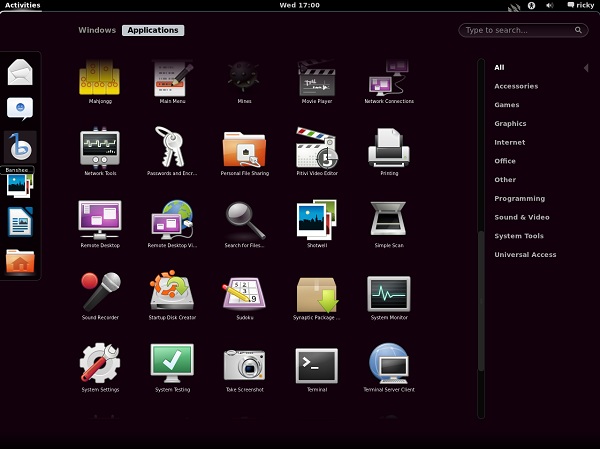
GNOME 3 has a new UI called the GNOME Shell. With Ubuntu 11.04, however, Canonical has decided to go with its own UI called Unity. Earlier we wrote a post on how you can install GNOME Shell in Ubuntu 11.04. In this post, we will tell you how to do it using the Ubuntu GNOME Remix PPA.

The Ubuntu GNOME Remix is a fairly new project which is aiming to create a derivative of Ubuntu which has the same base as Ubuntu but uses GNOME Shell as the UI instead of Unity.


Ubuntu 11.04 With GNOME Shell

Before you decide to go through with the installation, remember that this project is at a very early stage and you could face a lot of problems. Do not install this on a production machine and keep in mind that you cannot undo the changes.

Now that we have that warning out of the way, if you still want to install GNOME Shell in Ubuntu 11.04, follow the steps given below:

Remove gnome-accessibility-themes. It causes conflicts and dependencies issues with the installation.

$ sudo apt-get --purge remove gnome-accessibility-themes

Now add the Ubuntu GNOME Remix PPAs

$ sudo add-apt-repository ppa:gnome3-team/gnome3
$ sudo add-apt-repository ppa:ubuntugnometeam/ppa-gen
Finally install withe the command below:
$ sudo apt-get update && apt-get dist-upgrade
$ sudo apt-get install ugr-desktop-g3 gnome-shell

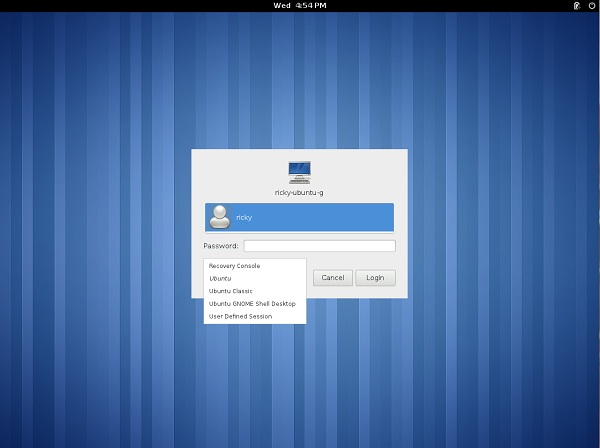
After the installation is done, restart your system. At the login screen, pick Ubuntu GNOME Shell Desktop.
What works? What does not work?

After the installation, GNOME Shell seems to work. The dash seems to work quite well. Occasionally, though, the Windows decoration gets all messed up. The GNOME Shell is not smooth and certainly should not be considered for any use except for testing at this point.

Unity uses GNOME 2 technologies and GNOME 3 uses GNOME 3 technologies. So, once GNOME Shell has been installed, Unity does not work although it is still available in the login screen.


         Submit to Reddit     Stumble


Related Posts by Tags: , , ,


  • Pingback: Links 28/4/2011: AMD (ATI) Catalyst 11.4, Red Hat GNU/Linux Growth | Techrights

  • Gość

    How to undo those changes?

    • http://digitizor.com/ Ricky Laishram

      As we have mentioned in the post, there is no way to undo the change.

      • Gość

        So the only way is to reinstall the system?

        • http://digitizor.com/ Ricky Laishram

          I am not sure if it will work but try removing the PPAs and installing ubuntu-desktop again

    • Gość

      sudo apt-get install ppa-purge
      sudo ppa-purge ppa:gnome3-team/gnome3
      sudo ppa-purge ppa:ubuntugnometeam/ppa-gen

      And everything was back to normal :)
      Too bad that even I can not use GNOME Shell :/

      • http://profiles.google.com/chrisgrenness Christopher Grenness

        thanks for the instructions, but it seems my grub was lost/destroyed in the process…
        I have (had) a dual boot with Windows 7, now I don’t see a boot menu, just Windows Boot Mgr complaining about “Windows failed to start”…
        Any tips on how to recover from this, and get back to normal Gnome (not 3 for me in quite some time, I’m afraid…)

        Christopher

        • Gość

          Hmm, well I have Win7 but had no such problems…
          Unfortunately, I do not know how you can help :/

  • http://www.facebook.com/people/William-Laureano/100000174810627 William Laureano

    I saw somewhere that if you install Xubuntu 11.04, the version with Xfce insted of the one with Unity, the main problems with Gnome 3 are solved. I tried it on and until now everthing is working fine…

  • http://www.facebook.com/people/William-Laureano/100000174810627 William Laureano

    One more thing: ATI Card driver not working with Gnome 3. Use the opensource driver instead.

    • Gość

      Unfortunately I can not find the open source drivers for my graphics card (RS880 [Radeon HD 4200]) :/

      • Gość

        That is, immediately after installation, Ubuntu detected and installed some drivers.

  • Veronique Bougie

    This guide suck ass


How To Install GNOME 3 Shell In Ubuntu 11.04 Using The Ubuntu GNOME Remix PPA was originally published on Digitizor.com on April 27, 2011 - 6:49 pm (Indian Standard Time)