Convert your favourite websites into desktop apps using Google Chrome

Advertisements

Earlier, we had shown you how to make desktop apps using an addon called Prism in Mozilla Firefox. But this feature comes by default in Google Chrome. In this article we tell you how to convert your favourite websites into desktop apps using Google Chrome. Just follow these steps: 1) Open your favourite website in Google Chrome Browser.

2) Click on the Control Current Page Button, next to the address bar.  From the drop down menu, select the Create Application Shortcuts… option. And, there you go. You’ve just made yourself a Desktop app for your most visited, favourite website.
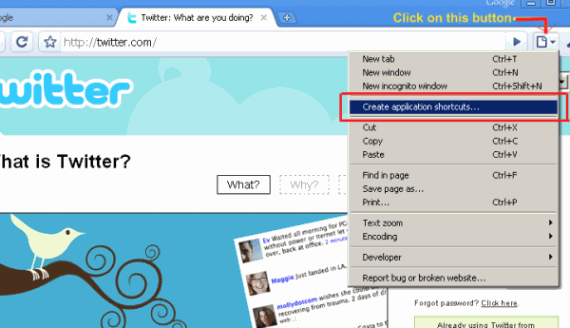
How to create desktop apps from your favourite websites using Google Chrome? - Digitizor

How to create desktop apps from your favourite websites using Google Chrome? - Digitizor

Related:Convert your favourite websites into desktop apps with Prism

Technorati Tags: google, chrome, desktop, app, website


March 8th, 2009 Written by The Digitizor    

Free subscription: Subscribe RSS feed or get daily tips in your email
* Click confirmation link sent in email * Don't see the email? check spam folder

  Facebook 


Liked it? Share...   Digg It!   Submit to Del.icio.us   Submit to Reddit   Stumble   Submit to Identica   Slashdot It   Send to a friend via email


blog comments powered by Disqus

Trackbacks