 A mail header is like the black-box of any e-mail. It reveals the actual information about who sent a e-mail and how authentic is the source of the e-mail. Mail headers can help you in one way to protect yourself from getting phished online. GMail does not show e-mail headers on the mail page. In this article we will tell you how to see full email headers in GMail.
1. Open your Gmail account and click on any new e-mail in the inbox to read it.
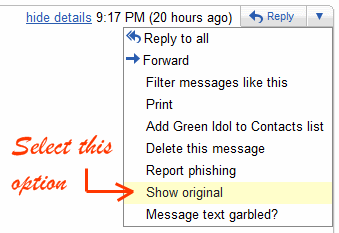
2. In this screen you will find a down arrow button next to the reply button on the right side of your gmail screen. Clicking on the bottom arrow brings a menu with lot of options. From this menu select the option called “Show Original“. Check this screenshot below: