 The new Amarok 2.0 series does not have an interface in the settings panel where you can set a proxy for enabling internet access to Amarok. This might be the case if you access internet using a Proxy. If you are in KDE then you can set a system wide proxy which Amarok can use, but if you are using only GNOME you need to check out this tip in order to set a proxy for Amarok while using it in GNOME.
Step 1: While you are in GNOME, navigate to the folder .kde/share/config located inside your home directory. Please note that the kde directory is a hidden directory (so the dot in front of it’s name). Check this article if you want to know how to show hidden files in Linux.
Step 2: Inside the .kde/share/config folder, there is a file named kioslaverc. You have to edit this. In short, just enter the following command in a terminal:
gedit ~/.kde/share/config/kioslaverc
or
nano ~/.kde/share/config/kioslaverc
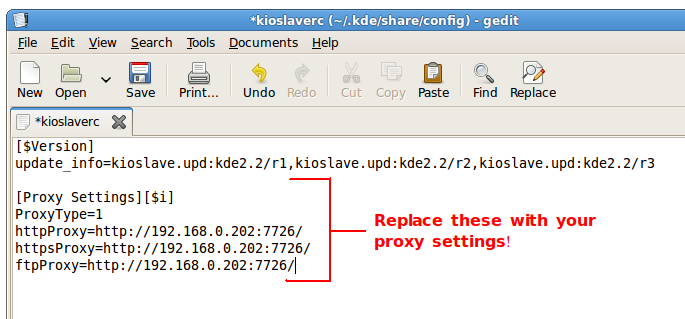
Step 3: Now append the following to the contents of that file:
[Proxy Settings][$i]
ProxyType=1
httpProxy=http://username:password@proxyserver:port/
httpsProxy=http://username:password@proxyserver:port/
ftpProxy=http://username:password@proxyserver:port/
Step 4: Now save the file and restart Amarok to reload the new settings. You can check this screen shot below: