 Fedora 12 Constantine is finally here and it looks better than ever. It has a myriad number of amazing features that you must try your hands at. We bring you this cheat sheet so that you can get started with Fedora 12 linux in no time. We have included many tips and tricks and scoops that will help you to set up your new Fedora 12 installation into a full blown Linux box.
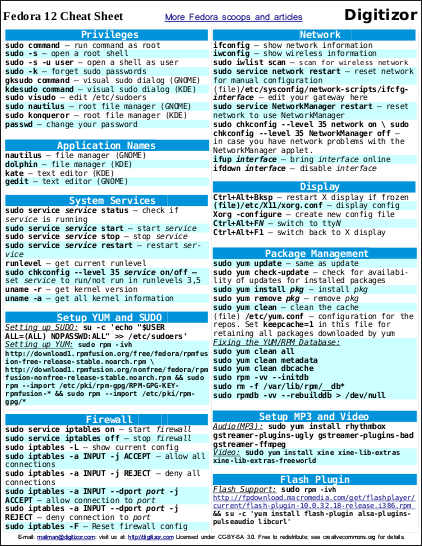
Here’s the Direct link to the above PDF. This sheet is free to modify and redistribute for your own needs; we just ask that you keep the Digitizor logo anda link to Digitizor: http://digitizor.wordpress.com on the page. License: Creative Commons Attribution-Share Alike 3.0 Unported.
In this cheatsheet, the command for setting up yum is pretty long, so you can copy it from this command snippet:
And one more thing, Do spread the word!