You Are Here: Home » Facebook » Programming

How To @ Tag An User While Publishing A Post Via Facebook Graph API

By on January 24th, 2011     

One of the most popular features on Facebook is tagging people in photos, videos, notes, status updates and other posts. It just helps you connect better with friends when you describe something on Facebook. So whenever you want to tag a friend on Facebook,  just include the "@" symbol and as you type the name, a drop-down menu will appear that allows you to choose from your list of friends.
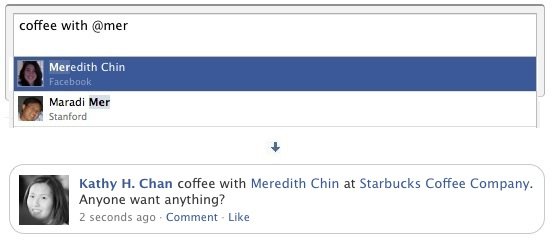
Tag Friends on Facebook via Graph API

So, wouldn't it be good if you could incorporate the @ Tagging feature in your Facebook applications and have the  @friend_name to be linked to an user's profile. In this article we will tell you how to @ Tag an user while publishing a post via Facebook Graph API.

In order to have @ Tag to an user's profile while publishing a post via Facebook Graph API, you have to include this code format in the message that you want to be published. (Thanks Takwing)

@[{user_id}:1:{name}]

So if you want to tag an user with the ID 1234567890, having name Nikka Mormola, you have to include the following in your message tag:

@[{1234567890}:1:{Nikka Mormola}]

Here is a screen shot of the @Tag process that has been achieved via the Graph API:
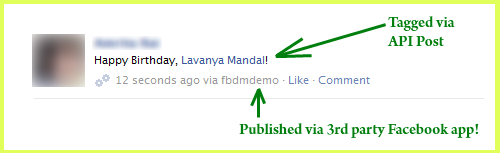
Tag Users in Facebook posts via Facebook Graph API

Tag Users in Facebook posts via Facebook Graph API from 3rd party app

And here is the full code snippet:

$uid = "1234567890"; //User's Facebook ID, set the value as "me" if publishing on logged in user's wall
$ufname = "Nikka Mormola"; // User's Full name on Facebook
$attachment = array(
'message'=> "Happy Birthday, @[".$uid.":1:".$ufname."]!",
);
try {
$post = $facebook->api('/'.$uid.'/feed', 'post', $attachment);
print_r($pp); //show the tagged post ID
} catch (FacebookApiException $e) {
//Error
exit;
}
--
If you are facing any problem with the implementation do write to me at: debjit@digitizor.com. You can also hire me for developing Facebook applications for you.


         Submit to Reddit     Stumble


Related Posts by Tags: , , , , , , , , , ,


  • reese

    Hi, thanks. But this doesn’t trigger a notification for the tagged users. Do you know why?

    • Anonymous

      Oh! I did not notice this. Thanks for bringing this to my attention, Let me figure something out and will get back to you ASAP

      • eric

        thanks for posting this! is there any update on generating a notification? i’m also interested in this..

        • http://www.facebook.com/alejandro.rigatuso Alejandro Rigatuso

          I cant make this work. Is it still working? Thanks.

    • http://www.facebook.com/alejandro.rigatuso Alejandro Rigatuso

      I tried all you mention in this post but it seems it is doesnt working. Any insights?

  • Pingback: Muscle Building Masterpiece: Everyday Guys Guide | atlanta accident attorney

  • http://www.dllerrorsfixed.com/solutions/ntdll.dll.html free scan

    any suggestions? Should I try to find an upgrade for my software or something? Thanks! Alethia x :)

  • Best-Uninstall-Tool

    You made some good points there. I did a search on the topic and found most people will agree with your blog.

  • Special-Uninstall

    I admire the valuable information you offer in your articles. I will bookmark your blog and have my children check

  • syuaa

    Its not work for me.

    • Mammot

      It works. But only the friend you tag won’t get notified.

      • Shannon

        Hi Mammot can you please post your code because this does not work for me.

        Like everybody else I simply get the users name posted and not a link.

        I am not fussed about the notification but I need the link to work.

      • http://www.facebook.com/alejandro.rigatuso Alejandro Rigatuso

        I doesnt work for me. Is it working for you now? Thanks a lot.

  • http://www.process-zone.com/processes/CXINST.exe.html Slow-Laptop-Fix

    Your awesome posts are very useful.

  • http://www.facebook.com/people/Александр-Васильев/1218414931 Александр Васильев

    thanks for posting!
    please correct:
    @[{1234567890}:1:{Nikka Mormola}]
    =>
    @[1234567890:1:Nikka Mormola]

    • Matías Gentiletti

      Hi, I try to tag to use this method but it seems that is no longer working. Do you have any update? Thank you so much.

  • TempoZero

    Any solution

  • tjonesnh

    Has anyone had luck with this recently? I’ve been unable to even get links when publishing via the stream API to a fan page. The format I’m using is @[:1:]

  • http://www.facebook.com/mikelantonio.trizio Michelantonio Stark Trizio

    Can anyone tell me if this solution still works?
    In my case, it writes the name of the tagged user, but doesn’t create the link. It writes the name of the user as simple text.

    • tjonesnh

      Michelantonia, I had the same problem with the stream.publish API. However, I discovered that if you use status.set rather than stream.publish, you do get a link. Hope that helps.

      • Jeremy

        Hi tjones, I tried using status.set, but I’m still not getting the link (though the status text is successfully adding to my wall.) Is it still working for you?

        Here’s my code:
        var params = new Object();
        params.access_token = accessToken;
        params.status = “This is a test @[123456789:1:Friend Name]“;
        FB.api(“status.set”, “post”, params, onPostStatusComplete);

        Any ideas?

        • Benny

          Hi,
          Did you manage to fix it?

        • tjonesnh

          Hey Jeremy,
            It seems this stopped working for me via status.set at some point in the past.  What you have looks correct and my code has not changed so I can only assume that FB changed something.

            And no, I never had any luck doing this via the graph API or using stream.publish.

      • Emil Tin

        status.set is part of the legacy REST api? have you made this work with new new graph api?

        • http://profiles.google.com/sahilsakhuja85 Sahil Sakhuja

          Was anybody able to do this with the Graph Api?

  • guestcheeze

    anyone, is this working? mine just print out the exact @[{id}:1:{name}] ;-)

  • Matías Gentiletti

    Hi, I tried with this method but it seems it no longer working. Anyone has any update? Thank you so much.

  • Joshorig

    Doesnt seem to work for me, the  @ part of the message simply is not shown in the post any ideas?

  • Anonymous

    Tagging in a Post object functionality isn’t exposed via the API as of, at least today. Tagging functionality is, however, exposed for Photo objects so it may come to Post objects soon.

    • Anonymous

      True

  • Pingback: How to tag user in Facebook post using Graph API? - feed99

  • Pingback: How to tag user in Facebook post using Graph API?

  • Pingback: Use Facebook Graph API to post a photo to a user's timeline with an @ tag - feed99


How To @ Tag An User While Publishing A Post Via Facebook Graph API was originally published on Digitizor.com on January 24, 2011 - 1:17 am (Indian Standard Time)