You Are Here: Home » How-To » Linux

How To Install Gnome 3 Desktop In Ubuntu Linux? [via PPA]

By on April 7th, 2011     

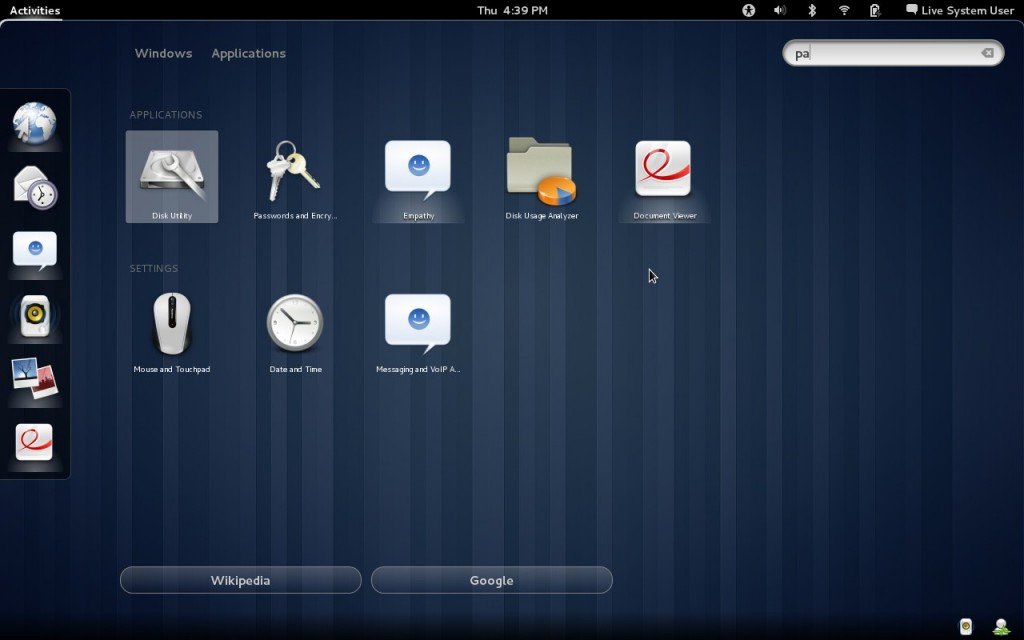
Gnome 3 is now finally available. However it will take some time before major Linux distributions start integrating Gnome 3 Desktop into their systems. Mean while, you can try Gnome 3 using a Live CD for your favourite Linux distribution. In case you are looking to install Gnome 3 Desktop on your Ubuntu 11.04 system in order to get a better feel, then here is a tutorial for you.


Gnome 3 looks so awesome!

Gnome 3 looks so awesome!


ATTENTION: We would like to say before hand that installing Gnome 3 on your system may break it and render many things un-usable as the Gnome 3 repository is highly unstable even now. So in case you are planning to install Gnome 3 on your production system, we would recommend you to hold on till your distribution comes out with a supported version of Gnome 3.

Note: Refer to this guide if you want to revert back to Unity after installing GNOME3.


Installing Gnome 3 Desktop in Ubuntu 11.04 Natty Narwhal

Step 1: Install the Gnome 3 team's Ubuntu PPA (repository) using this command:

sudo apt-add-repository ppa:gnome3-team/gnome3

Step 2: Now update your software sources:

sudo apt-get update

Step 3: Install the Gnome 3 Desktop environment using this command:

sudo apt-get install gnome-desktop3

If the above does not work for you, then you can try the following, as suggested by Aechols in the comments. (Please not we have not tested these steps, which the above mentioned user has talked about)

sudo apt-get remove gnome-accessibility-themes
sudo apt-get dist-upgrade
sudo apt-get install gnome-shell
sudo apt-get install gnome3-session


Installing Gnome 3 Desktop in Ubuntu 10.10 Maverick Meerkat

Gnome 3 Desktop can be installed in Ubuntu 10.10 Maverick using the following commands. Please note that this PPA (For Ubuntu 10.10) is old and hasn't been updated unlike Natty and there is NO WAY TO ROLL BACK!

sudo add-apt-repository ppa:ubuntu-desktop/gnome3-builds 
sudo apt-get update
sudo apt-get install gnome-desktop3

Reboot your computer after the installation is over so that the new components and the environment can sink in properly. In case you are facing a problem or want to report a bug, you can do it here.


         Submit to Reddit     Stumble


Related Posts by Tags: , , , , ,


  • Pingback: How To Install Gnome 3 Shell in Ubuntu Linux?

  • Pingback: Install / Try Gnome 3 On Ubuntu, Fedora, OpenSUSE (Gnome3)

  • Pingback: Install StatCounter on Joomla website | Web Visitors Today

  • wtf

    not working. here’s what I get on step 3: Unable to locate package gnome-desktop3

    • Anonymous

      The packages in the repository are only for Ubuntu 11.04. Which version of Ubuntu are you using?

      • wtf

        10.10
        do you mean that it’ll work if I install 11.04 beta ?

        • Anonymous

          Yes, the packages in the repository are only for Ubuntu 11.04

          • wtf

            and now I can’t even upgrade to 11.04
            gets some stupid update-manager error
            smh
            I think I’ll just wait

            • http://digitizor.com/ Ricky Laishram

              Yes. I would suggest waiting for the final release of Ubuntu 11.04. I too ran into some problem upgrading from 10.10 to 11.04 beta.

    • http://www.facebook.com/vivekspanicker Vivek S Panicker

      Try the second step mentioned above

  • Aechols

    You can revert:

    sudo apt-get install ppa-purge
    sudo ppa-purge ppa:gnome3-team/gnome3

    Also, it should be:

    sudo apt-get update
    sudo apt-get dist-upgrade
    sudo apt-get install gnome-shell
    sudo apt-get install gnome3-session

    • wtf

      would that work with 10.10 ?

      • aechols

        No, you need to use this repo for 10.10…

        http://www.ubuntuupdates.org/ppas/66

      • Anonymous

        No… the packages in the repository are only for Ubuntu 11.04

      • Aechols

        For Maverick:

        sudo add-apt-repository ppa:ubuntu-desktop/gnome3-builds
        sudo apt-get update
        sudo apt-get install gnome-desktop3

        This is older, and hasn’t been updated since November 2010, and unlike Natty, there is NO WAY TO ROLL BACK! Unless of course you know how to use apt-get, dpkg and logs to grab the necessary packages and re-install the correct packages for Maverick.

    • Jdwilkins8

      Neither of these work for me. Using 11.04 on an ASUS X83V laptop with nvidia graphics. Unity doesn’t work either. *shrugs*

      • Aechols

        That’s because there are currently dependency issues that haven’t been resolved in the natty ppa (gnome3-session-bin), the last one I put, is MAVERICK ONLY.

      • Aechols

        Your unity issue is different, you need to do one of two things: 1. install the 2d version of Unity or 2. rmmod nouvea and install the precompiled binaries from nVidia or use the additional drivers app to install the current version of the nVidia drivers. Now if Unity broke from the the Gnome3 attempted install, you can try the ppa-purge method listed above, otherwise you’ll have to track back through the logs and install the packages that need to be reinstalled.

    • Anonymous

      Thanks for this tip :-)

  • Pingback: Install Gnome 3 Desktop in Ubuntu via PPA (Gnome3 Repository)

  • Pingback: Install Gnome 3 Desktop in Ubuntu via PPA (Gnome3 Repository)

  • http://www.facebook.com/vivekspanicker Vivek S Panicker

    I could see the second method works fine for me. I am using MSI U100 netbook

  • niki

    Yeah it is really unstable. If you’re a normal user – step back and wait for a better version. That’s not what i expect from a beta, sorry but it’s far away from a usable beta

  • http://www.facebook.com/vivekspanicker Vivek S Panicker

    While I am trying to install GNOME 3 session, following error comes. I tried using command
    sudo apt-get install gnome-desktop3

    The following packages have unmet dependencies:
    gnome3-session : Depends: gnome-session-bin (< 2.33) but 3.0.0-0ubuntu1~build1 is to be installed

    Could someone advise on this?

    • Klss

      Same here. Though the 3.00 package is installed

    • Skimitar

      I managed to get around this by downloading the gnome-session deb from the PPA and manually installing via dpkg. Using gnome 3 now.

  • http://twitter.com/blowfish08 blowfish08

    Is it possible to install Gnome 2 & Gnome 3 at the same machine?
    or the new version replaces the old one??

    • http://digitizor.com/ Ricky Laishram

      it will replace the old one.

      • http://twitter.com/blowfish08 blowfish08

        mmmmm… think i m gonna wait for a while then!! thanx for the response ;)

  • Pingback: Instalirati Gnome 3 Desktop na Ubuntu preko PPA (Gnome3 Riznice) « Postati Linux korisnik

  • Pingback: Install Gnome 3.0 on Ubuntu 11.04 (beta2) i386 « denniswever.dyndns.org

  • Pingback: Instalar Gnome 3 desde repositorios en Ubuntu

  • Pingback: Gnome 3 released something to rival M$ + DL bittorrent to fedora beta with gnome 3

  • Pingback: How To Install GNOME 3 Shell In Ubuntu 11.04 Using The Ubuntu GNOME Remix PPA

  • Pingback: Mikael Carlsson - Ubuntu 11.04

  • http://www.facebook.com/profile.php?id=1652036700 Michal Vyšinský

    Hi, I have one question: Can I switch between Unity and Gnome 3 after installation. I mean switching between sessions at system login page. Thank you

  • Pancheus

    I’m currently using 10.10 and it looks like this: http://i51.tinypic.com/okmtki.png

    I want it to look like this: http://www.coolorama.com/wp-content/uploads/2010/07/d2d68788db15572.png.png

    What’s the problem?

  • Pingback: How To Recover Unity After Removing GNOME 3 In Ubuntu 11.04


How To Install Gnome 3 Desktop In Ubuntu Linux? [via PPA] was originally published on Digitizor.com on April 7, 2011 - 3:46 pm (Indian Standard Time)