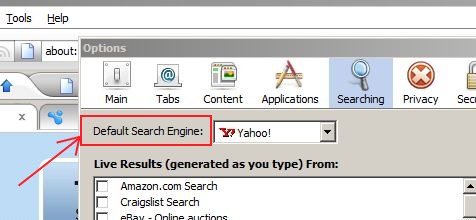
The default search engine in the search bar of Flock Browser is Yahoo! Unlike Mozilla Firefox, you can not change the default search engine in the Flock Browser with a single click. In order to change the default search engine in the Flock Search bar, you should take the following steps:
- Go to Tools > Options. (if you are using FLock on linux, then you need to go to Edit > Preferences.) A dialog box will open up.
- Select the Searching tab in the dialog box.
- Now select your prefered search engine from the Default Search Engine menu.