 Many sysadmins have to create VHD (Virtual Hard Disk – Microsoft’s Virtual Machine disk format) versions of physical disks for use in Microsoft Virtual PC or Microsoft Hyper-V virtual machines (VMs). Although there are plenty of tools available for this but most of them are either not free or require the system to be offline before creating the the VHD file. In this article we will tell you about a free tool that lets you create a Virtual Machine/VHD of a live (running) Windows OS on physical machine.
Disk2vhd is a utility that creates a VHD out of physical disks for use in Microsoft Virtual PC or Microsoft Hyper-V virtual machines (VMs). The difference between Disk2vhd and other physical-to-virtual tools is that you can run Disk2vhd on a system that’s online unlike other solutions and it is FREE!
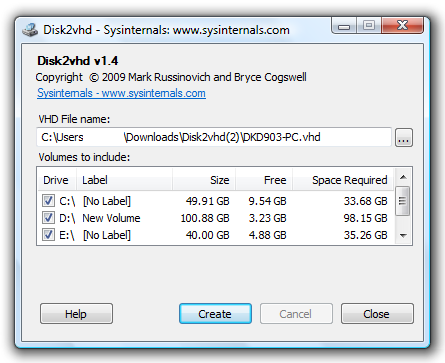
Although Disk2Vhd is a command line tool, you can use it from the command line too. Here is how:
Usage: disk2vhd <[drive: [drive:]…]|[*]> <vhdfile>
Example: disk2vhd * c:\vhd\snapshot.vhd
You can Download it from the Official Website of the tool.