 While installing and configuring a Ruby On Rails web application on your web server or localhost you might encounter an error that says “Unpacked Gem In Vendor/gems Has No Specification File”. For example while installing Shapado on a web server, I faced a similar error. In this article we will tell you how to fix these errors for any Ruby On Rails (ROR) web application in general.
All gems in a ROR web application’s vendor folder have a specs file – .specification. The “Unpacked Gem In Vendor/gems Has No Specification File” error is generally thrown when the above mentioned specification file is missing from that directory. But you need not panic in case you get the same error too. You can easily generate a new specification file for your gem using the following steps:
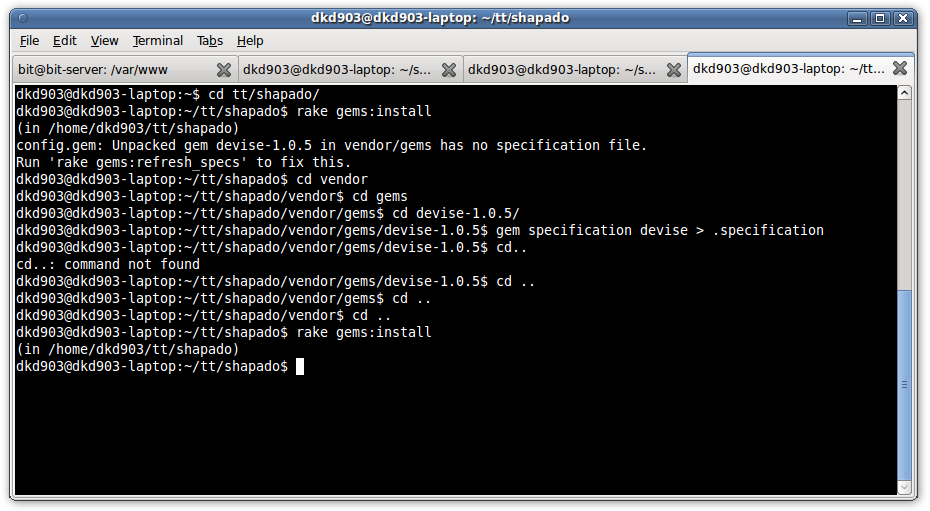
Step 1: Navigate to the directory of your gem or the required gem in consideration. For example, I had to deal with a gem named devise (v1.0.5) while installing Shapado. So I navigated to the required folder: [HOME]/shapado/vendor/gems/devise-1.0.5
Step 2: Now use this command to create the spec file.
This command will create a hidden file named specification in the gem directory. Please note that you have to specify the name of the gem in this command without the version of the gem and you must be inside the directory of the gem. For example while creating a specification file for devise-1.0.5 gem, I would use the command:
gem specification devise > .specification
After the creation of this file, you can go ahead with the installation of your app and you will not find any more such errors. You can check this screenshot below: