 Facebook advertisements (ads) are very different than all other regular ads that you see. Facebook pairs advertisements with relevant social actions from a user’s friends to create Facebook Ads. These Ads make use of your Pictures from your Facebook Albums thus making the ads more interesting and more useful to you and your friends. But there might be a possibility that you or one of your friends would not like the photos to be available to the ads. We will tell you how to protect your photos from appearing in the Facebook ads.
In order to protect your photos from appearing in the Facebook ads, you need to set your Ads preferences in your Facebook settings. To do so you may directly go to the Facebook Ads preferences at: https://ssl.facebook.com/privacy/?view=feeds&tab=ads. Alternatively, You can also reach the Ads preferences page navigating in the following order: Settings > Privacy > News Feed and Wall > Facebook Ads.
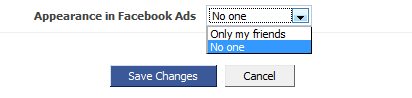
On the Ads preferences page, select No one from the drop down menu (if you want that your photos should not appear in the Facebook Ads) and click on Save Changes. You might also like to tell your friends about this trick and remind them of updating their Facebook Ads preferences.