You Are Here: Home » Microsoft » Windows 7

'Show Desktop' quicklaunch button in Windows 7

By on January 28th, 2009     

In the beta version of Windows 7, there has been a change in the placement of the 'Show Desktop' quick-launch button. It is now placed at LEFT-BOTTOM corner, as you can check in this screen shot below.
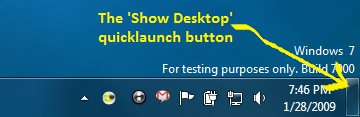
show-desktop-w7

Although this is not a big issue, but at times users may get carried away by searching for the 'Show Desktop' button in the bottom-right corner as in previous versions of windows. If you are looking to get back the quick launch bar then read this article.

PS: You could also try this shortcut key combination: WIN + SPACE to have a peek into the Desktop. Mark the word - 'peek'


         Submit to Reddit     Stumble


Related Posts by Tags: , , , , , , ,


  • Teerthankar

    metacafe is an aggregator.. isnt it?

  • NoNy Mouse

    Hm, strange… it look’s to me like this is the RIGHT side, not “LEFT-BOTTOM”, isn’t it? :D

  • DK

    TIP: Press Windows-key + D (D stands for Desktop) to show your desktop. If you press win+D again the minimized windows will come up again. (For those who arent’t familair with the windows hotkeys. ;-)


'Show Desktop' quicklaunch button in Windows 7 was originally published on Digitizor.com on January 28, 2009 - 2:34 pm (Indian Standard Time)