Google has made some modifications to the way Gmail handles attachments. Untill now attachments were added individually and there was no indication of how much of a large file has been uploaded.
Now Google has made multiple-select of attachments possible. To do this just click on attachments and a new window will open where you can select multiple files by CTRL clicking (CMD on Mac) or SHIFT clicking to select a continuous list of files.

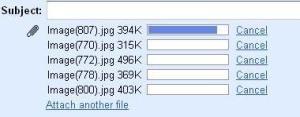
Another thing that have changed is the progress bar for the attchments. Now there is a progress bar which indicated how much of an attachment has been uploaded. This is a really handy feature is we want to attach large files with our emails.
While these are very handy features, they are nothing new as they have been available with most of the e-mail clients, like Mozilla’s Thunderbird, for a long time now.
You can see the post about this in the Official GMail Blog here. You can read more of our google related articles in the Google Section.
Technorati tags: GMail attachments multiple select progress bar