Changed your email address? make sure your old feedburner account goes with you

By on June 5th, 2009     

If you are a blogger or an author you must know what Feedburner is. It is a service that allows you to manage all your feed subscriptions and have a look at your subscription stats. It is a Google Service and is associated with a Google Account. Now if someday, you change your e-mail address, you have to start all over again with a new feedburner account, as Feedburner won't allow you to transfer feeds to your current account from an old account. Instead it allows you to transfer the ownership of your current feed from your old email address to your new email address. Here is how you transfer your Feedburner account associated with your old email id to the new email id

1. Log into your old feedburner account and Select the feed you want to transfer.

2. Then Click on Transfer Feed link in the page that opens. (Check the image below)
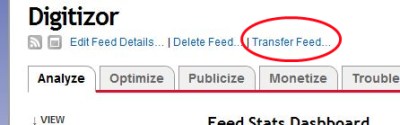
feedburner transfer feed screenshot

3. Now enter your New E-mail address and click on Confirm. (Check the image below)
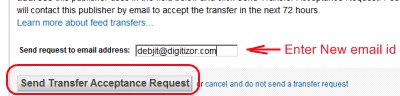
Confirm the Feedburner account transfer screenshot

4. You will be sent an email to your new email address asking you to confirm this transfer request. Clink on the link in the email and you are done. You have just sintegrated your old feedburner account into your new email address.

Technorati Tags: , ,


         Submit to Reddit     Stumble


Related Posts by Tags: , , ,


  • amir

    I’m having a problem which I’ve been searching high and low on the internet for.

    I have transferred my feed to the new email but the mail outs are still showing the old email address. the one I’ve transferred from.

    Been looking everywhere for a ray of light on this issue. All I am finding is a lot of others with the same issue.

    If you’d be kind as to solve this, I will personally make sure this blog is linked as the answer.

    pls help

  • vanessa

    the exact same problem, i have transferred my feed as outlined above but the mail outs are still showing the old email address, help

  • Pippa

    “I have transferred my feed to the new email but the mail outs are still showing the old email address”

    Yup, same problem here! Anyone know how to fix it??

  • Anonymous

    Same here with the old email address! I waited several days to see if it would resolve, but not so far. Is there a setting to adjust?

  • Anonymous

    Aha!
    Via maryc.fromNZ from http://www.google.com/support/forum/p/blogger/thread?tid=02afa81d36aa6a25&hl=en

    Log into Feedburner.
    Click on your feed’s name.
    Click on the Publicize tab.
    Click on the email subscriptions option.
    Click on Communication Preferences
    Enter the email address you want your emails to be from in the “Email From Address” field.
    Click Save (bottom left corner).

    Finally!


Changed your email address? make sure your old feedburner account goes with you was originally published on Digitizor.com on June 5, 2009 - 5:13 pm (Indian Standard Time)