You Are Here: Home » Articles » How-To » Microsoft » OS » Web » Windows

How to manage settings for an IIS web server and FTP server in Windows 7?
By on June 20th, 2009     

iislogoWindows 7 comes with an inbuilt IIS web server and a FTP server. We have already shown you how to install an IIS web server or an FTP server on your Windows 7 system. In this article, we will tell you how to manage the settings for either of IIS web and the FTP servers in Windows 7.

1. Open the Control Panel on your system. And click on Administrative Tools. In case you are unable to locate Adminstrative Tools in the control panel, you may need to switch to 'View all control panel items' from the "View by" menu at the top right in your control panel window.

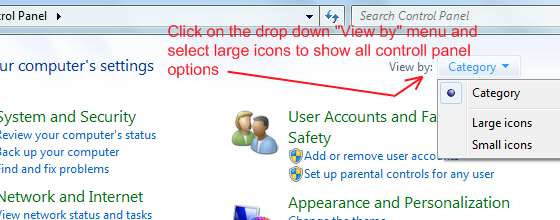
ftp iis windows7 settings - locate administrative tools ftp iis windows7 settings - in case administrative tools are not visible


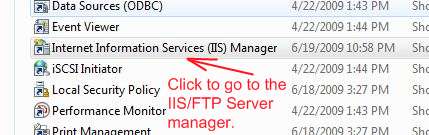
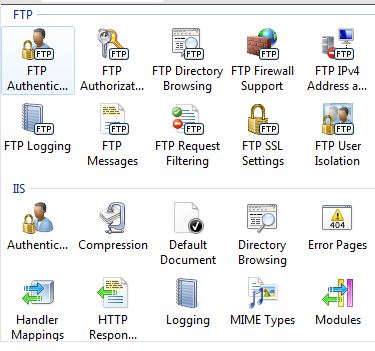
2. In the Administrative Tools windows, locate "Internet Information Services Manager" and click on it. You can now see a new window with lot of settings / options in it categorised separately under FTP and IIS.
ftp iis server settings view ftp-iis-windows7-settings-4


3. The icons under FTP help you to manage the settings of your FTP server like Authorization of access, firewall rules for your FTP, managing access logs and more. The section for IIS settings / options help you tinker with IIS web server options such as managing your default index pages and custom error documents. You can also manage output caching in order to reduce the load on your server. All this and you have many more options to look at and tinker with.


         Submit to Reddit     Stumble


Related Posts by Tags: , , , , ,


  • Nana Parkhe

    this information very useful to me thanks

  • http://www.zwartcomputerconsulting.com Brian Zwart

    i have just one question…. when you specify a user for the http://ftp.domain.com in iis 7.0, how do i specify a password for that user? I see no option for that….. help!!!!

    Brian

    • http://www.best-registrycleaner.net registrycleaner

      You Can Find That Option in FTP Authentication Module

  • http://digitizor.com The Digitizor

    You Can Find That Option in FTP Authentication Module … For This Module You Need to install all modules of the FTP Package

  • http://ranacseruet.blogspot.com/ rana

    i have installed as like as above, but however, i didn’y get the iis manager there. What can i do?

    • Anonymous

      This is a tested article and it works. May be you have missed on a step or two. So please go through it once again and try, Thankyou!

    • http://digitizor.com/ Ricky Laishram

      Approce

    • dejan

      You need to install IIS management console so that you can see IIS manager
      Article stated that FTP is server is enough by itself, but you can’t manage anything unless you install above

  • Steve

    I have followed your steps in creating an ftp server in windows 7 and then started on managing my settings when I discovered that the Internet Information Services Manager does not show up in my list of item under Administrative Tools. What did I do wrong? Thanks.

    • http://twitter.com/Lothinator Lothinator

      Same issue! All FTP services “installed” and checkmarked under Windows Features, but no IIS manager. Does something ELSE (such as web server, etc) need to also be installed? Please do not skip important steps in guides like this!Same issue! All FTP services “installed” and checkmarked under Windows Features, but no IIS manager. Does something ELSE (such as web server, etc) need to also be installed? Please do not skip important steps in guides like this!

      • frank

        go to “turn windows features on or off”
        under “internet Information Services” goto Web management tools and tick the iis management console option

    • IT Guy

      In order for Internet Information Services Manager to show up in your Administrative Tools List you must first install Microsoft IIS (Internet Information Services, formerly called Internet Information Server) on your computer. You can find it in the same features section.(The same place you’ve already installed the FTP Server from.) You can use the following link for a fast and simple install.

      http://digitizor.com/2009/02/20/how-to-install-microsoft-iis-server-on-windows-7/

  • http://www.getfuqd.com Ruhk

    Hey! GREAT TUTORIAL. nuff said.

  • Nitin Kumar 0000

    i have window7 home premiun what should i do to install IIS ?

  • Mlnsarma_btechcse

    in my administrative tools i am not able to see the iis what i have to do???please help me in giving a good answer?

    • http://profiles.yahoo.com/u/2BM7V5OLSOV6PC2YLC3LPKSKSE Anonymous

      I have the same problem, too.

  • Goggles957

    Go to control panel – programs & features – Turn windows features on or off. Scroll down to Internet Information Services; expand the tree. I had to check each box (in expanded view) before mine would work…

  • Pingback: How to install a FTP server in Windows 7?

  • Pancho2992

    I had the same problem, but then I also click on “Web Management Tool” and “World Wide Web Services” and iis manager came out.

  • http://security-wire.com/10/how-to-remove-antivirus-action-rogue-anti-spyware.html remove antivirus action virus

    This will be great if it will work. Thanks for sharing it.

  • Pingback: Manage settings | UniverseHd

  • JimP

    awesome article, thanks for taking the time to write it up Debjit!

    problem: now that I have IIS management tools and the FTP server installed, I can connect to my server both internally on the LAN and externally from the interwebz – I can’t seem to get past the logon prompt though. :(

    from what I understand of FTP thus far, the username and password you provide should be a local user (and in the admin group) on your PC. but it’s not working, so my logic must be flawed….or I don’t have something configured right.

    can someone shed some light on this?!

    thanks again!

  • Anonymous

    Thank you so much for this list! It is very useful for me. 

  • Anonymous

    thanks so much! I’m searching for such information!

  • Indiaguns

    ma chudao

  • Slappy

    Just like all of your other ‘articles’…

    How to make a cake.

    Step 1: Get bowl, pan, oven and ingredients.
    Step 2: Put ingredients in bowl, mix.
    Step 3: Put mix in pan, bake.

    Suck.

  • http://digitizor.com The Digitizor

    Glad, You liked it :-)


How to manage settings for an IIS web server and FTP server in Windows 7? was originally published on Digitizor.com on June 20, 2009 - 3:14 pm (Indian Standard Time)