The Gnome Shell redefines user interactions with the Gnome desktop. It offers new ways for the user to find and open applications and documents, switch between various activities, and view incoming information such as chat messages or system notifications. You can check out this full featured screen shot tour of Gnome Shell. In this article we will tell you how to install Gnome Shell in Fedora linux, the latest being Fedora 15.
UPDATE: Gnome 3 is finally out, you can try it on Fedora Linux. See this for more information.
For installing the Gnome shell you need to have two packages installed on your Fedora System – desktop-effects and gnome-shell. In case desktop-effects package is already installed, you need not do it again. Run this command in a terminal:
After installation is over, you can enable the Gnome Shell from System > Preferences > Desktop Effects as shown below:
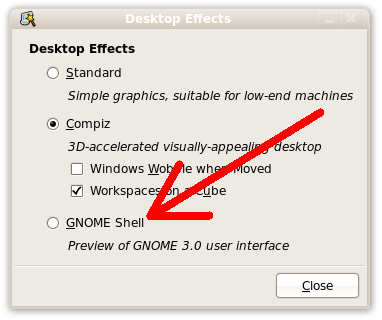
Gnome Shell can also be started from the Command Line using this command:
In case you want that Gnome Shell should start every time you log into Gnome, then you can try this amazing tweak. Just issue this command in a terminal:
In case any of the step doesn’t work for you then you may leave a comment for help. You might also like to read How To Install Gnome 3 Shell in Ubuntu Linux.