In the beta version of Windows 7, there has been a change in the placement of the ‘Show Desktop’ quick-launch button. It is now placed at LEFT-BOTTOM corner, as you can check in this screen shot below.
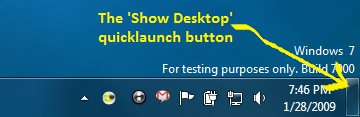
Although this is not a big issue, but at times users may get carried away by searching for the ‘Show Desktop’ button in the bottom-right corner as in previous versions of windows. If you are looking to get back the quick launch bar then read this article.
PS: You could also try this shortcut key combination: WIN + SPACE to have a peek into the Desktop. Mark the word – ‘peek’